
 Polski
 Magyar
 Deutsch
 Español
 Italiano
 Lietuvių
 Română
 Srpski



What’s new in ONeQ2 2026
More convenience, data and flexibility in B2B sales.
At ONe we keep developing features that support the daily work of sales reps, streamline the purchasing process for B2B customers and help manage sales better.
The latest improvements cover customer communication, the presentation of products and stock levels, as well as complaint handling, documents, payments and platform personalisation. All so that using ONe is more intuitive, more convenient and better matched to real sales processes.
New landing pages in the customer account – more flexible communication
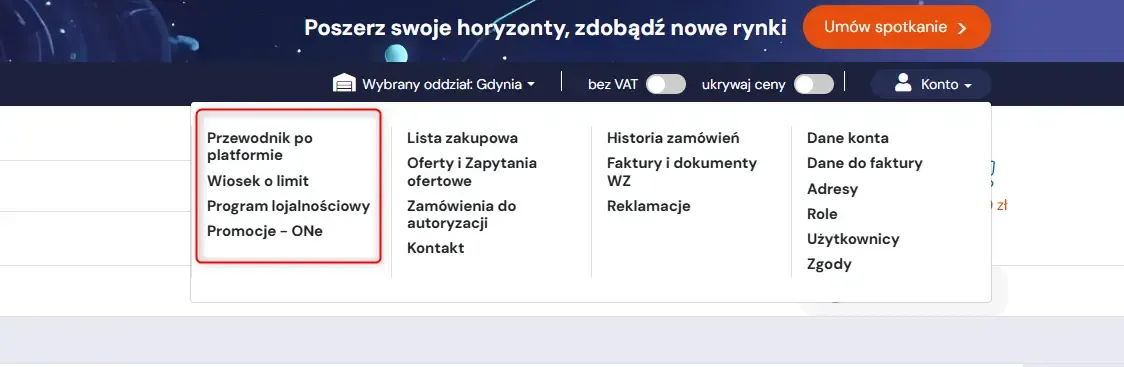
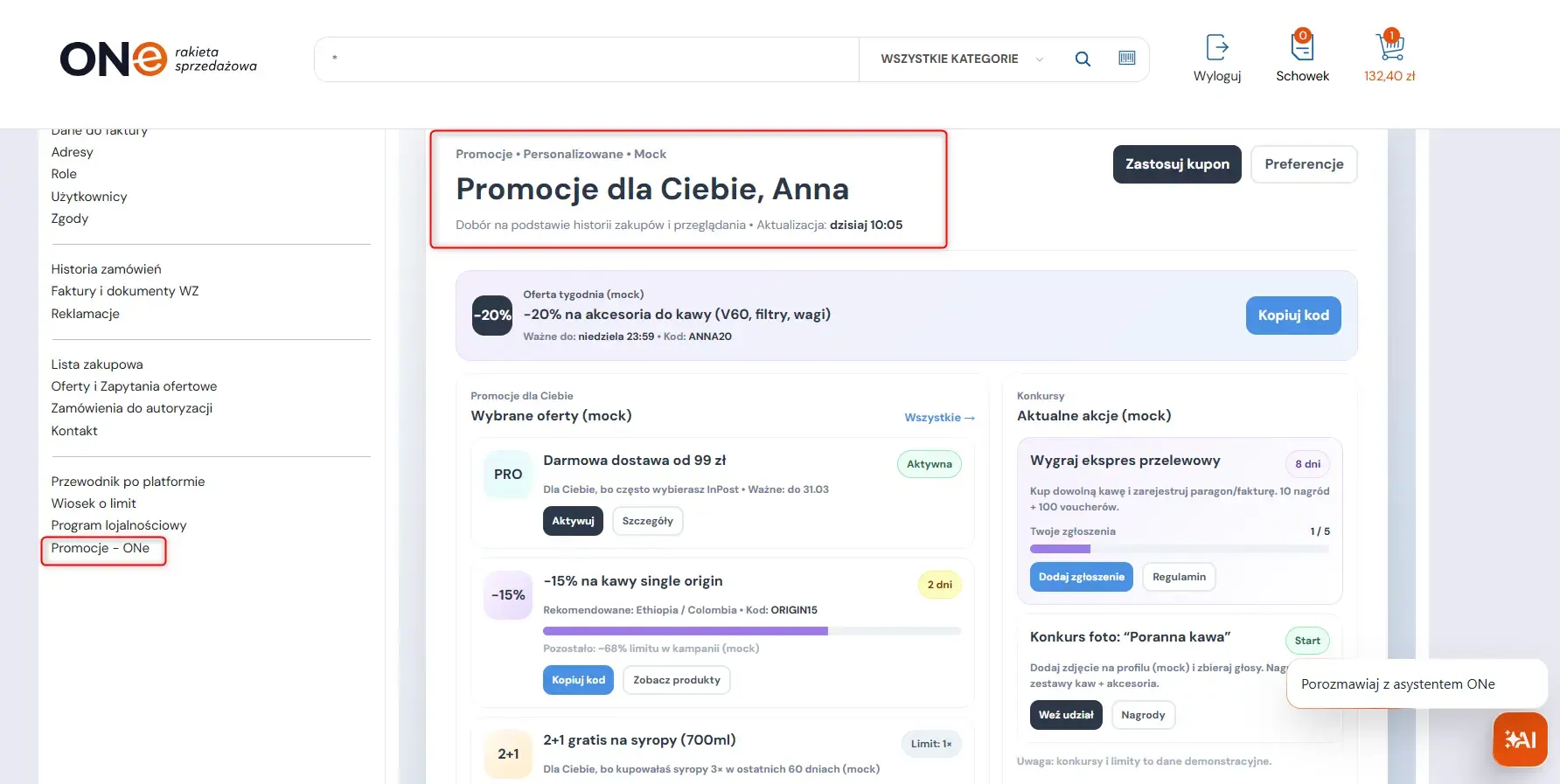
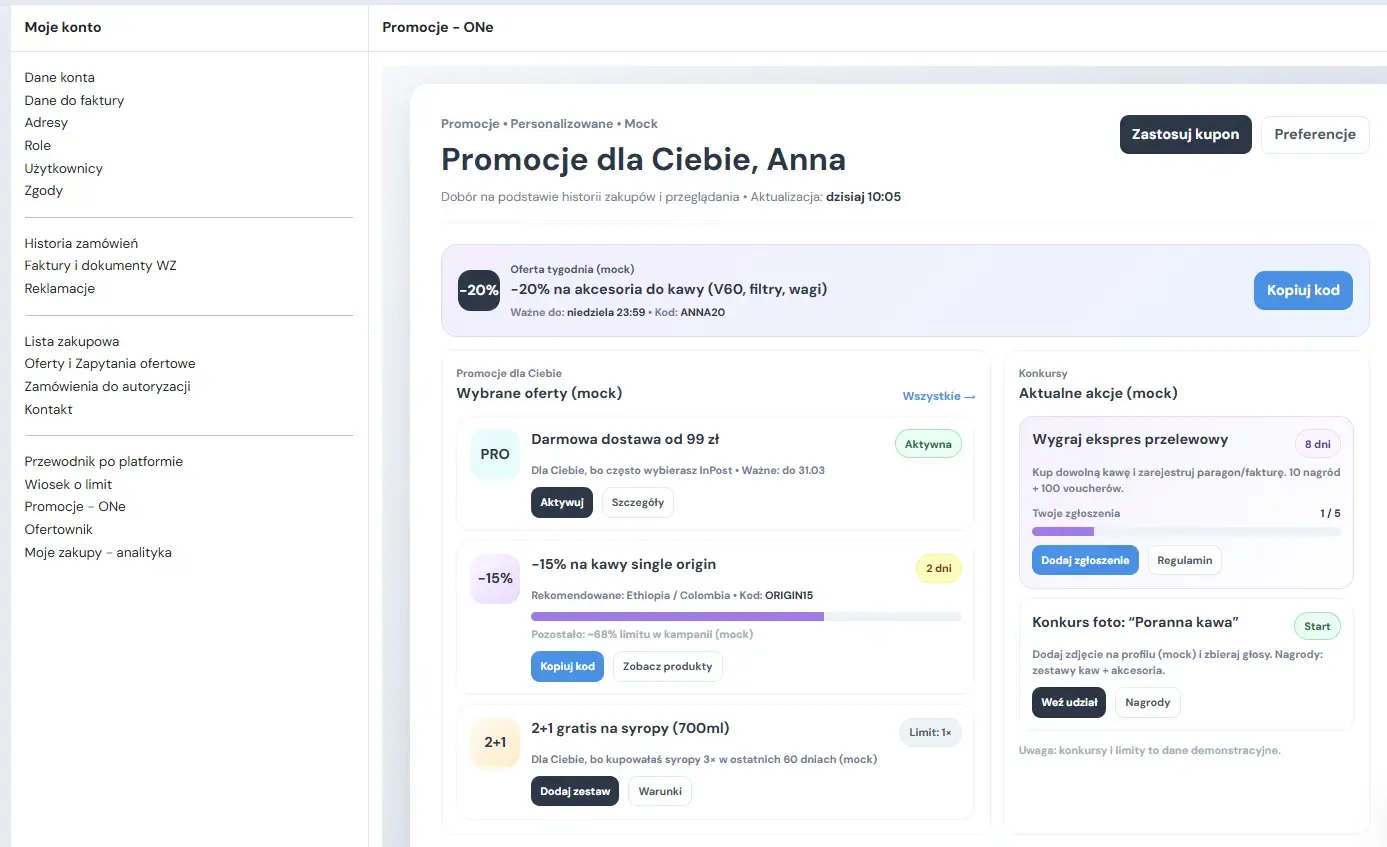
We have extended content management options in the customer account. Administrators can now add new pages, i.e. landing pages, directly in the customer account’s side menu.
This means the ONe platform can be not only a place for placing orders, but also a space for communicating with customers. The additional pages can be used to publish, for example, important information, educational materials, special offers or dedicated messages.
New landing pages automatically appear in the customer account’s side menu, at the end of the list of existing pages. Their order is fixed, which helps keep the navigation clear.
The feature allows you to:
- create new pages in the customer account from the CMS in the admin panel,
- define the name and content of each page,
- publish additional content that supports sales and communication,
- automatically display landing pages in the customer account’s side menu,
- present content depending on the customer segment assigned.
This solution increases the platform’s personalisation options and makes it easier to pass on important information directly in the customer’s buying environment.

Stock level display – fuller information on product availability
We have improved how product availability is presented. Users of the sales platform can see not only the stock levels in the warehouses they have access to, but also aggregated information on the availability of goods in the other warehouses.
A new field, “Quantity available in other warehouses”, now appears on the product list and on the product page. It shows the total stock across all warehouses that are not available to the given customer, without revealing their detailed structure.
The feature includes:
- displaying stock levels from the warehouses assigned to the customer, with their names, as before,
- presenting the total availability of products in the remaining warehouses as a single aggregated value,
- making the information available both on the product list and on the product page,
- automatically including all warehouses the customer has no access to,
- using the current stock data available in the system.
The feature is off by default and can be enabled depending on business needs. It works especially well when the customer only sees stock from their assigned warehouses, but it is worth showing that the item is available within the organisation. In that scenario, the information can encourage them to contact Customer Service or a sales advisor.
On platforms where customers can order products from all warehouses, the feature does not change the purchasing process. It simply provides additional information about the availability of goods.

Automatic alerts for sales reps – faster response to unavailable products
We have improved order handling by adding automatic e-mail alerts for sales reps when a customer places an order that contains unavailable products.
After an order is created, the system checks product availability. If the order contains at least one unavailable product:
- the customer receives the standard order confirmation,
- the sales rep assigned to the customer receives an additional e-mail about the shortages.
The new e-mail uses a separate template, “Order with unavailable products – information for the sales rep”, available in the E-mail templates tab. The content of the message is editable and covers a similar range of data to the standard order confirmation, with additional labels:
- “Not available” for products that are completely unavailable,
- “Partially available” for products that are partially available.
The feature works only for orders placed from the sales platform with the Unavailable or Partially available status. It is not sent for RFQ orders or for fully available orders. The additional e-mail goes only to the sales rep, not to the customer.
The solution is off by default and can be activated on a given tenant. It helps you react to shortages faster, contact the customer and propose an alternative.

KSeF number and document link – easier matching of invoices with the National e-Invoice System
ONe can now display the KSeF number and a link to the document in the National e-Invoice System (KSeF) directly in the system.
This lets users match invoices and credit notes in ONe with documents in KSeF faster, find them more easily and check that they are correct.
The new improvement includes:
- displaying the KSeF number below the invoice number and the credit note number on document listings and on individual documents,
- availability of the information both in the Sales Panel and on the sales platform,
- a link to the invoice in KSeF directly in invoice and credit note documents,
- the ability to search documents by KSeF number in the Sales Panel and on the sales platform.
The feature speeds up document management, makes accounting processes more transparent and makes the daily work easier for users who need to match documents with KSeF.

Visible logged-in operator account – more convenient work for sales reps
We have added a small but practical feature to the Sales Panel. The operator details now show which account the operator is currently logged in to.
For customers who handle several accounts in ONe, this simple improvement makes it easier to keep your bearings, minimises the risk of mistakes and makes daily work more comfortable.

Product comparison tool – easier choices and faster purchasing decisions
We have introduced a product comparison tool that lets users compare the technical and price parameters of several products in a single view.
The tool shortens the time needed to analyse the offer and helps you pick the product that best matches your current needs. The comparison tool is available to both logged-in and logged-out users, and the system automatically remembers the selected products. As a result, the comparison remains available even after the page is refreshed.
Key capabilities of the comparison tool:
- quickly adding products to the comparison from the listing or the product page,
- comparing up to 4 products – adding another one automatically replaces the oldest entry,
- highlighting the differences between products,
It is a feature that helps customers move faster from analysing the offer to making a purchasing decision.

Attachments in complaints – smoother handling and greater security
To simplify the complaints process and shorten the time needed to exchange information, we have added the ability to attach files directly to complaint requests.
Customers can now document the reported problem better, which makes verification easier for the sales rep or Customer Service.
Key features:
- up to 10 files can be added to a single request,
- support for photos, PDF documents, text descriptions and other popular formats,
- automatic antivirus scan of every file before it is saved on the server,
- support for extensions such as .jpg, .png, .pdf, .doc, .docx, .txt and .zip,
- a clear upload progress indicator,
- the ability to manage files before the form is finally submitted.
As a result, the complaints process is more complete, secure and convenient for the user.

B2B financing with PragmaPay – deferred payments and limit management
The ONe platform has been integrated with the PragmaPay financing system. This solution lets business customers use deferred payment for their purchases, and lets distributors increase sales volume while eliminating credit risk.
The integration is designed so that the financing process is transparent and automated, both when placing an order and when managing invoice payments.
Key features and benefits of the integration:
Instant order financing
When completing a purchase in the basket or accepting a sales offer, the customer can choose PragmaPay as the payment method. After a positive decision, the ONe system automatically changes the status to “Accepted – deferred financing”. The order is paid, and the funds are repaid directly between the customer and the payment operator. The platform owner is not involved in the settlement.
Managing invoices from the customer account
The customer can log in to the panel and decide on their own which invoices to pay with PragmaPay credit: individually or in bulk. The feature covers documents worth between PLN 100 and PLN 50,000, including invoices overdue by up to 14 days.
Credit limit preview 24/7
When paying for an order with deferred payment, the customer can apply for a credit limit and use it on subsequent purchases without being verified again by the system. The available credit limit is shown on the PragmaPay page in the customer panel, and the data is retrieved in real time.
Support for sales reps
The PragmaPay method is also available in the Sales Panel. This allows the account manager, when preparing an offer, to propose deferred payment as an additional sales argument.
PragmaPay in ONe is not just a new payment method, but also a tool that supports B2B sales and gives customers purchasing flexibility.


Free embedding of plugins – more platform personalisation options
We have increased the flexibility of managing the platform’s appearance by allowing plugins to be embedded on any landing page in the e-commerce system.
This lets administrators add extra tools exactly where they are needed: on the home page, the product page or static pages.
The new feature allows you to:
- add banners, social widgets and promotional modules on the home page,
- enrich the product page with calculators, configurators or review systems,
- personalise static pages with interactive elements, forms or external scripts.
This solution gives you more freedom to adapt the platform to your sales, marketing and information needs.
Supporting your business
The new ONe features support several key areas of B2B sales: customer communication, product availability, order handling, documents, complaints, payments and platform personalisation.
Thanks to these improvements, the platform can respond even better to the needs of customers, sales reps and administrators. It makes daily work easier, organises processes and gives you more options to adapt the system to the way your particular company works.

Let’s work together
Achieve more, faster with our cutting-edge B2B platform. Streamline your sales processes, boost operational efficiency, and build stronger customer relationships. Get in touch with us today to see how we can help your business grow.


You’ll receive a confirmation e-mail once your message has been sent.
By clicking Send you consent to the processing of your personal data for the purpose of contacting you. All information on the processing of personal data and your rights can be found in our privacy policy. You can ask further questions by writing to: iod@b2b.one
